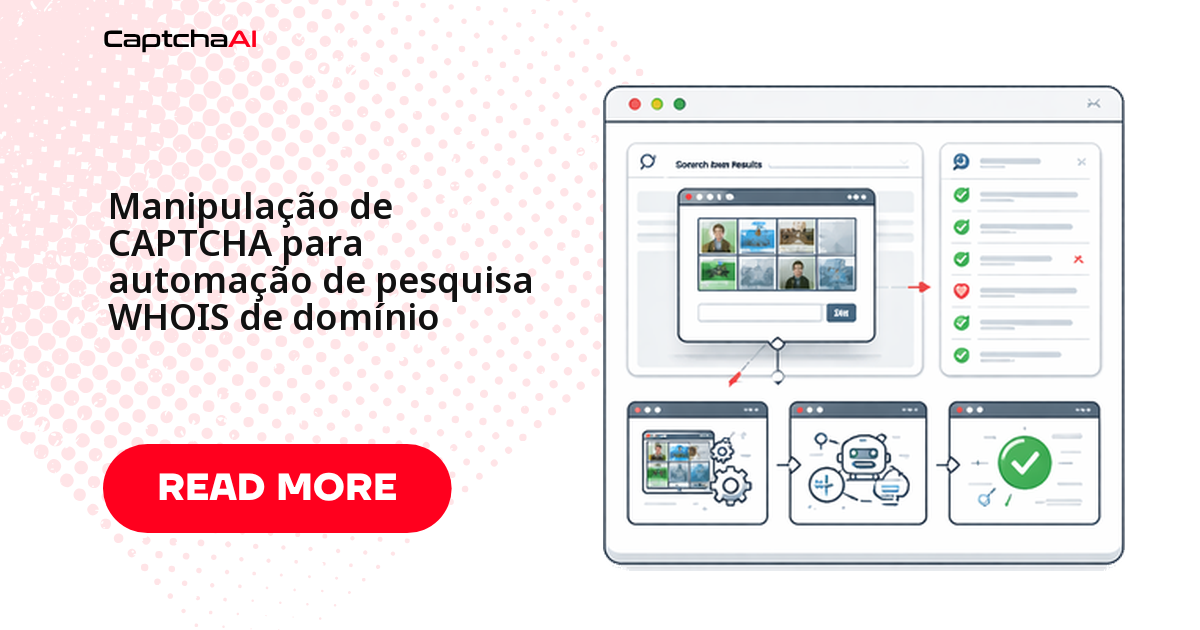
Quantas consultas WHOIS dá para fazer antes do CAPTCHA aparecer? Normalmente entre 3 e 10, dependendo do portal — depois disso, reCAPTCHA v2, CAPTCHA de imagem ou Cloudflare Turnstile entram no caminho, seja você consultando disponibilidade de domínio, verificando titularidade ou monitorando data de vencimento. Este guia mostra como manter a consulta automatizada resolvendo esses desafios em tempo real com a API da CaptchaAI, com exemplos prontos em Python (consulta avulsa e em lote) e Node.js (monitoramento de vencimento), além de táticas para reduzir a frequência do CAPTCHA e evitar bloqueio de IP.
Onde o CAPTCHA aparece nas consultas WHOIS
Cada categoria de portal reage de um jeito diferente ao volume de consultas. A tabela resume os padrões mais comuns em portais de registro, ferramentas regionais e leilões de domínio:
| Tipo de portal | CAPTCHA | Limite de disparo |
|---|---|---|
| WHOIS da ICANN | reCAPTCHA v2 | 3 a 5 consultas por sessão |
| Páginas de pesquisa de registrador | reCAPTCHA v2/v3 | 5 a 10 consultas por minuto |
| NIR regional (APNIC, RIPE) | CAPTCHA de imagem | 10 a 20 consultas |
| Leilão de domínio WHOIS | Cloudflare Turnstile | Checagens rápidas de domínio |
| Ferramentas WHOIS em massa | CAPTCHA personalizado | Após o limite do nível gratuito |
Se você audita ou monitora domínios de clientes brasileiros, trate os dados retornados pelo WHOIS — nome do titular, e-mail, telefone — como dado pessoal desde a captura. A LGPD (Lei Geral de Proteção de Dados) se aplica ao cache local tanto quanto ao banco de produção; para consultas de domínios europeus, a mesma lógica vale sob o RGPD.
Automatizando a consulta WHOIS com resolução de CAPTCHA em Python
A classe abaixo cobre o fluxo mais comum: fazer a requisição, detectar se apareceu reCAPTCHA v2, resolver via CaptchaAI e reenviar o formulário com o token. Ela também dá suporte a consulta em lote e a uma checagem simples de disponibilidade — útil para validar uma lista de nomes candidatos de uma vez.
import requests
import time
import re

class WhoisLookup:
    def __init__(self, api_key):
        self.api_key = api_key
        self.session = requests.Session()
        self.session.headers.update({
            "User-Agent": "Mozilla/5.0 (Windows NT 10.0; Win64; x64) AppleWebKit/537.36"
        })

    def lookup(self, domain, whois_url):
        """Look up WHOIS data for a domain, solving CAPTCHAs as needed."""
        response = self.session.get(whois_url, params={"domain": domain})

        if self._has_recaptcha(response.text):
            site_key = self._extract_site_key(response.text)
            token = self._solve_recaptcha(site_key, whois_url)
            response = self.session.post(whois_url, data={
                "domain": domain,
                "g-recaptcha-response": token
            })

        return self._parse_whois(response.text)

    def bulk_lookup(self, domains, whois_url, delay=3):
        """Look up WHOIS for multiple domains."""
        results = {}
        for domain in domains:
            try:
                results[domain] = self.lookup(domain, whois_url)
            except Exception as e:
                results[domain] = {"error": str(e)}
            time.sleep(delay)
        return results

    def check_availability(self, domains, whois_url):
        """Check which domains are available for registration."""
        results = self.bulk_lookup(domains, whois_url)
        available = []
        taken = []

        for domain, data in results.items():
            if data.get("error") or data.get("status") == "available":
                available.append(domain)
            else:
                taken.append(domain)

        return {"available": available, "taken": taken}

    def _has_recaptcha(self, html):
        return "g-recaptcha" in html or "recaptcha" in html.lower()

    def _extract_site_key(self, html):
        match = re.search(r'data-sitekey="([^"]+)"', html)
        if match:
            return match.group(1)
        raise ValueError("reCAPTCHA site key not found")

    def _solve_recaptcha(self, site_key, page_url):
        resp = requests.post("https://ocr.captchaai.com/in.php", data={
            "key": self.api_key,
            "method": "userrecaptcha",
            "googlekey": site_key,
            "pageurl": page_url,
            "json": 1
        })
        task_id = resp.json()["request"]

        for _ in range(60):
            time.sleep(3)
            result = requests.get("https://ocr.captchaai.com/res.php", params={
                "key": self.api_key,
                "action": "get",
                "id": task_id,
                "json": 1
            })
            data = result.json()
            if data["status"] == 1:
                return data["request"]

        raise TimeoutError("reCAPTCHA solve timed out")

    def _parse_whois(self, html):
        from bs4 import BeautifulSoup
        soup = BeautifulSoup(html, "html.parser")

        # Look for WHOIS data in pre-formatted blocks or tables
        raw_whois = soup.select_one("pre, .whois-data, #whois-result")
        if raw_whois:
            text = raw_whois.get_text()
            return self._extract_fields(text)

        return {"raw": soup.get_text()[:2000]}

    def _extract_fields(self, text):
        fields = {}
        patterns = {
            "registrar": r"Registrar:\s*(.+)",
            "created": r"Creat(?:ed|ion) Date:\s*(.+)",
            "expires": r"(?:Expir(?:y|ation)|Registry Expiry) Date:\s*(.+)",
            "updated": r"Updated Date:\s*(.+)",
            "status": r"(?:Domain )?Status:\s*(.+)",
            "nameservers": r"Name Server:\s*(.+)",
            "registrant": r"Registrant (?:Name|Organization):\s*(.+)"
        }

        for field, pattern in patterns.items():
            matches = re.findall(pattern, text, re.IGNORECASE)
            if matches:
                fields[field] = matches if len(matches) > 1 else matches[0].strip()

        return fields


# Usage
whois = WhoisLookup("YOUR_API_KEY")

# Single lookup
result = whois.lookup("example.com", "https://whois.example.com/lookup")
print(f"Registrar: {result.get('registrar')}")
print(f"Expires: {result.get('expires')}")

# Bulk availability check
domains = ["startup-name.com", "my-project.io", "cool-app.dev"]
availability = whois.check_availability(domains, "https://whois.example.com/lookup")
print(f"Available: {availability['available']}")
Troque YOUR_API_KEY pela sua chave de API da CaptchaAI e ajuste whois_url para o portal de cada registrador. O _extract_fields cobre os campos mais comuns — registrar, datas, status, nameservers — mas alguns TLDs retornam o texto em formato levemente diferente, então vale revisar os padrões de regex caso a caso.
Monitorando o vencimento de domínios em Node.js
Para acompanhar o vencimento de uma carteira de domínios, o padrão muda de consulta avulsa para monitoramento contínuo: guardar um histórico por domínio e avisar quando faltarem 30 dias ou menos. A classe DomainMonitor abaixo faz isso em Node.js, reaproveitando a mesma lógica de resolução de reCAPTCHA v2 via CaptchaAI.
class DomainMonitor {
  constructor(apiKey) {
    this.apiKey = apiKey;
    this.watchList = new Map();
  }

  addDomain(domain, whoisUrl) {
    this.watchList.set(domain, { url: whoisUrl, history: [] });
  }

  async checkExpirations() {
    const expiring = [];

    for (const [domain, config] of this.watchList) {
      try {
        const data = await this.lookup(domain, config.url);
        config.history.push({ ...data, checkedAt: new Date().toISOString() });

        if (data.expires) {
          const daysLeft = Math.ceil(
            (new Date(data.expires) - new Date()) / (1000 * 60 * 60 * 24)
          );
          if (daysLeft <= 30) {
            expiring.push({ domain, daysLeft, expires: data.expires });
          }
        }
      } catch (error) {
        console.error(`Failed to check ${domain}: ${error.message}`);
      }
    }

    return expiring;
  }

  async lookup(domain, whoisUrl) {
    const response = await fetch(`${whoisUrl}?domain=${domain}`);
    const html = await response.text();

    if (html.includes('g-recaptcha')) {
      return this.solveAndLookup(domain, whoisUrl, html);
    }

    return this.parseWhois(html);
  }

  async solveAndLookup(domain, whoisUrl, html) {
    const match = html.match(/data-sitekey="([^"]+)"/);
    if (!match) throw new Error('No reCAPTCHA site key found');

    const submitResp = await fetch('https://ocr.captchaai.com/in.php', {
      method: 'POST',
      body: new URLSearchParams({
        key: this.apiKey,
        method: 'userrecaptcha',
        googlekey: match[1],
        pageurl: whoisUrl,
        json: '1'
      })
    });
    const { request: taskId } = await submitResp.json();

    for (let i = 0; i < 60; i++) {
      await new Promise(r => setTimeout(r, 3000));
      const result = await fetch(
        `https://ocr.captchaai.com/res.php?key=${this.apiKey}&action=get&id=${taskId}&json=1`
      );
      const data = await result.json();
      if (data.status === 1) {
        const response = await fetch(whoisUrl, {
          method: 'POST',
          body: new URLSearchParams({
            domain,
            'g-recaptcha-response': data.request
          })
        });
        return this.parseWhois(await response.text());
      }
    }
    throw new Error('reCAPTCHA solve timed out');
  }

  parseWhois(html) {
    const extract = (pattern) => {
      const match = html.match(pattern);
      return match ? match[1].trim() : null;
    };

    return {
      registrar: extract(/Registrar:\s*([^\n<]+)/i),
      created: extract(/Creat(?:ed|ion) Date:\s*([^\n<]+)/i),
      expires: extract(/(?:Expir(?:y|ation)|Registry Expiry) Date:\s*([^\n<]+)/i),
      status: extract(/(?:Domain )?Status:\s*([^\n<]+)/i)
    };
  }
}

// Usage
const monitor = new DomainMonitor('YOUR_API_KEY');
monitor.addDomain('example.com', 'https://whois.example.com/lookup');
monitor.addDomain('mysite.io', 'https://whois.example.com/lookup');

const expiring = await monitor.checkExpirations();
expiring.forEach(d => console.log(`${d.domain} expires in ${d.daysLeft} days`));
Rode checkExpirations() em um cron job — uma vez por dia já é suficiente na maioria dos casos, já que vencimento de domínio não muda de uma hora para outra.
Como reduzir a frequência de CAPTCHA nas consultas WHOIS
A forma mais eficiente de lidar com CAPTCHA em WHOIS é reduzir quantas vezes ele aparece, não só resolvê-lo mais rápido:
| Estratégia | Benefício |
|---|---|
| Armazenar resultados em cache localmente | Evita consultar o mesmo domínio duas vezes no mesmo dia |
| Usar intervalos de 3 a 5 segundos entre requisições | Reduz a taxa de disparo do CAPTCHA |
| Alternar entre portais WHOIS | Distribui a carga entre diferentes registradores |
| Manter a sessão persistente | Preserva o estado de liberação do CAPTCHA entre consultas |
Se a maior parte dos domínios monitorados usa portais e registradores no Brasil, rodar o worker de consulta em uma região próxima — como sa-east-1 (São Paulo) na AWS — reduz o RTT de cada requisição e encurta o tempo total do ciclo antes do token do reCAPTCHA expirar.
Erros comuns na consulta WHOIS automatizada
| Problema | Causa | Correção |
|---|---|---|
| CAPTCHA depois de poucas consultas | Limite de taxa do portal | Aumente o intervalo entre requisições e use proxies |
| WHOIS retorna "Sem correspondência" | Redação de privacidade ou RDAP | Tente um portal WHOIS alternativo |
| Token do reCAPTCHA rejeitado | O token expirou antes do envio | Resolva e envie o formulário em até 2 minutos |
| IP bloqueado | Limite diário de consultas excedido | Faça rotação de proxies e reduza o volume por IP |
| Campos vazios no resultado | O formato de resposta varia por TLD | Ajuste os padrões de regex por registrador |
Perguntas frequentes sobre CAPTCHA em consultas WHOIS
WHOIS ou RDAP: qual usar para automação com menos CAPTCHA?
Depende do que você precisa. WHOIS pela porta 43 não tem CAPTCHA, mas os dados vêm sem padronização e sofrem redação por privacidade. RDAP é o sucessor oficial, retorna JSON estruturado e também não usa CAPTCHA — mas nem todo TLD ou registrador ainda expõe um endpoint RDAP completo. Na prática, os portais web com CAPTCHA continuam sendo a fonte mais completa para boa parte dos domínios.
Quantas consultas WHOIS dá para automatizar por dia sem tomar bloqueio?
Na maioria dos portais web, entre 50 e 200 consultas por IP por dia antes de cair em limitação agressiva. Com rotação de proxy e a CaptchaAI resolvendo os desafios que aparecem, dá para escalar para milhares de consultas por dia distribuídas entre vários IPs.
Dá para automatizar o alerta de vencimento de domínio por e-mail?
Sim. Agende o checkExpirations() do exemplo em Node.js para rodar diariamente, salve o histórico e dispare um e-mail ou webhook quando daysLeft ficar abaixo do limite que você definir. A CaptchaAI cuida do CAPTCHA em cada execução, sem intervenção manual.
Consultar WHOIS em massa tem alguma restrição pela LGPD?
Os dados de titular expostos no WHOIS — nome, e-mail, telefone — são dados pessoais, então armazená-los, mesmo em cache local, entra no escopo da LGPD. Isso não impede a automação, mas define por quanto tempo guardar esses dados, com que finalidade e como protegê-los. A mesma lógica vale sob o RGPD para domínios europeus.
O CaptchaAI resolve todos os tipos de CAPTCHA que aparecem em WHOIS?
Cobre os mais comuns: reCAPTCHA v2, reCAPTCHA v3 e Cloudflare Turnstile, além de CAPTCHA de imagem/OCR. hCaptcha e FunCaptcha não são suportados atualmente — se um registrador específico usar um desses, esse caso precisa de outra abordagem.
Artigos relacionados
- Como resolver o callback do reCAPTCHA v2 via API
- reCAPTCHA v2 e Cloudflare Turnstile no mesmo site
- Como funciona o callback do reCAPTCHA v2
Próximas etapas
Pare de perder consultas WHOIS para o CAPTCHA — crie sua chave de API da CaptchaAI e resolva reCAPTCHA v2, CAPTCHA de imagem e Cloudflare Turnstile direto no seu script de automação.