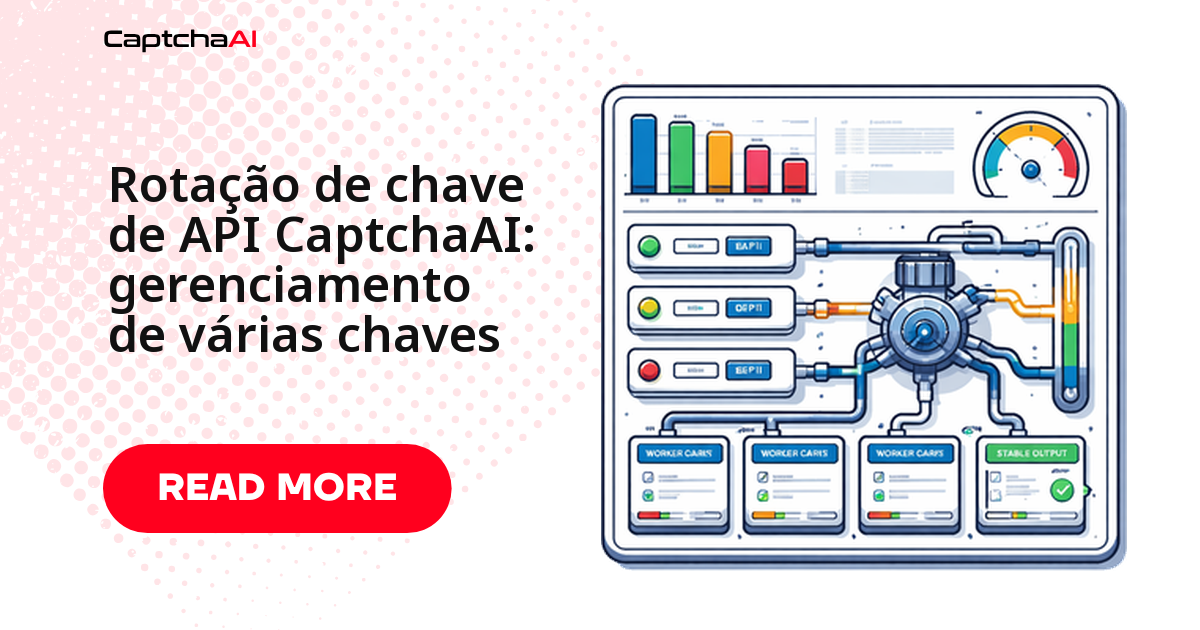
Uma chave de API sozinha é um ponto único de falha na sua automação: se o saldo zera, a taxa de requisições estoura ou a conta é suspensa, o pipeline inteiro para. A correção é distribuir as chamadas entre várias chaves — round-robin, peso por saldo ou failover automático — para que a falha de uma única chave nunca derrube o resto da fila. Este guia mostra as três estratégias com código pronto em Python e JavaScript.
Antes de entrar no código, um resumo rápido das três estratégias:
- Round-robin: alterna as chaves em sequência fixa — simples e previsível.
- Ponderada por saldo: dá mais peso às chaves com mais crédito disponível.
- Failover: troca de chave automaticamente quando uma falha — mantém a fila rodando mesmo com uma conta suspensa.
Rotação round-robin entre chaves de API
A estratégia mais simples é passar pelas chaves em sequência, sempre na mesma ordem:
Python
import itertools
import requests

API_KEYS = [
    "KEY_ACCOUNT_1",
    "KEY_ACCOUNT_2",
    "KEY_ACCOUNT_3",
]

key_cycle = itertools.cycle(API_KEYS)


def get_next_key():
    return next(key_cycle)


def solve_captcha(sitekey, page_url):
    api_key = get_next_key()
    resp = requests.post("https://ocr.captchaai.com/in.php", data={
        "key": api_key,
        "method": "userrecaptcha",
        "googlekey": sitekey,
        "pageurl": page_url,
        "json": "1",
    })
    data = resp.json()
    if data["status"] != 1:
        raise Exception(f"[{api_key[:8]}...] {data['request']}")

    print(f"Submitted with key {api_key[:8]}...")
    return data["request"], api_key


task_id, used_key = solve_captcha("6Le-SITEKEY", "https://example.com")
Um cenário comum entre agências de automação no Brasil: cada cliente recebe sua própria conta e chave na CaptchaAI, para manter saldo e limites de requisição separados entre projetos. Com os workers rodando na região sa-east-1 da AWS (São Paulo), a rotação round-robin garante que o esgotamento da chave de um cliente não pare a fila dos demais — cada chave carrega só o seu próprio tráfego.
Para ilustrar, veja como a distribuição de chaves poderia funcionar por cliente:
| Cliente | Chave | Motivo |
|---|---|---|
| Cliente A | KEY_ACCOUNT_1 |
Conta própria, saldo dedicado |
| Cliente B | KEY_ACCOUNT_2 |
Conta própria, saldo dedicado |
| Cliente C | KEY_ACCOUNT_3 |
Conta própria, saldo dedicado |
Rotação ponderada por saldo das chaves
Para não desperdiçar chaves com saldo baixo, dê mais peso às que têm mais saldo disponível:
import random
import requests
import threading

SUBMIT_URL = "https://ocr.captchaai.com/in.php"
RESULT_URL = "https://ocr.captchaai.com/res.php"


class KeyRotator:
    def __init__(self, keys):
        self.keys = {k: {"balance": 0, "failures": 0, "disabled": False} for k in keys}
        self._lock = threading.Lock()
        self.refresh_balances()

    def refresh_balances(self):
        for key in self.keys:
            try:
                resp = requests.get(RESULT_URL, params={
                    "key": key, "action": "getbalance", "json": "1"
                }, timeout=10).json()
                if resp["status"] == 1:
                    self.keys[key]["balance"] = float(resp["request"])
                    self.keys[key]["disabled"] = False
                else:
                    self.keys[key]["disabled"] = True
            except Exception:
                self.keys[key]["disabled"] = True

    def get_key(self):
        with self._lock:
            available = {
                k: v for k, v in self.keys.items()
                if not v["disabled"] and v["balance"] > 0.01
            }
            if not available:
                raise Exception("No API keys with balance available")

            # Weighted random by balance
            keys = list(available.keys())
            weights = [available[k]["balance"] for k in keys]
            return random.choices(keys, weights=weights, k=1)[0]

    def report_failure(self, key, error_code):
        with self._lock:
            self.keys[key]["failures"] += 1
            if error_code in ("ERROR_WRONG_USER_KEY", "ERROR_KEY_DOES_NOT_EXIST",
                              "ERROR_ZERO_BALANCE", "ERROR_IP_NOT_ALLOWED"):
                self.keys[key]["disabled"] = True
                print(f"[rotator] Disabled key {key[:8]}...: {error_code}")

    def report_success(self, key, cost=0.003):
        with self._lock:
            self.keys[key]["balance"] -= cost
            self.keys[key]["failures"] = 0


rotator = KeyRotator(["KEY_1", "KEY_2", "KEY_3"])

# Usage
api_key = rotator.get_key()
# ... solve captcha ...
rotator.report_success(api_key)
Essa abordagem compensa quando as contas têm saldos bem diferentes — por exemplo, uma chave recém-criada ao lado de outra já em uso há meses. Se os saldos estiverem parecidos, o round-robin simples já resolve.
Failover: trocando de chave quando uma falha
Se uma chave falhar no meio da requisição, tente a próxima automaticamente:
Python
def solve_with_failover(sitekey, page_url, max_attempts=3):
    for attempt in range(max_attempts):
        api_key = rotator.get_key()
        try:
            resp = requests.post(SUBMIT_URL, data={
                "key": api_key,
                "method": "userrecaptcha",
                "googlekey": sitekey,
                "pageurl": page_url,
                "json": "1",
            }, timeout=15)
            data = resp.json()

            if data["status"] != 1:
                rotator.report_failure(api_key, data["request"])
                continue

            rotator.report_success(api_key)
            return data["request"], api_key

        except requests.RequestException:
            rotator.report_failure(api_key, "NETWORK_ERROR")
            continue

    raise Exception(f"All {max_attempts} keys failed")
JavaScript
const axios = require('axios');

class KeyRotator {
  constructor(keys) {
    this.keys = keys.map(k => ({ key: k, disabled: false, failures: 0 }));
    this.index = 0;
  }

  getKey() {
    const available = this.keys.filter(k => !k.disabled);
    if (available.length === 0) throw new Error('No API keys available');
    const entry = available[this.index % available.length];
    this.index++;
    return entry.key;
  }

  disable(key, reason) {
    const entry = this.keys.find(k => k.key === key);
    if (entry) {
      entry.disabled = true;
      console.log(`[rotator] Disabled ${key.substring(0, 8)}...: ${reason}`);
    }
  }
}

const rotator = new KeyRotator(['KEY_1', 'KEY_2', 'KEY_3']);

async function solveWithFailover(sitekey, pageurl, maxAttempts = 3) {
  for (let i = 0; i < maxAttempts; i++) {
    const apiKey = rotator.getKey();
    try {
      const resp = await axios.post('https://ocr.captchaai.com/in.php', null, {
        params: { key: apiKey, method: 'userrecaptcha', googlekey: sitekey, pageurl, json: 1 }
      });
      if (resp.data.status !== 1) {
        rotator.disable(apiKey, resp.data.request);
        continue;
      }
      return { taskId: resp.data.request, apiKey };
    } catch (err) {
      rotator.disable(apiKey, 'NETWORK_ERROR');
    }
  }
  throw new Error('All keys failed');
}
A lógica é a mesma nos dois idiomas: desativar a chave que devolveu um erro permanente e passar para a próxima, sem interromper o fluxo por causa de uma única falha.
Comparativo rápido: qual estratégia escolher
Cada abordagem resolve um problema diferente — use esta tabela para decidir rapidamente:
| Cenário | Estratégia recomendada |
|---|---|
| Poucas chaves, saldos parecidos entre elas | Round-robin |
| Chaves com saldos bem diferentes entre si | Ponderada por saldo |
| Prioridade é nunca parar a fila, mesmo com uma conta suspensa | Failover |
| Operação de alto volume com múltiplas contas | Combine as três: failover por cima de uma rotação ponderada |
Quando uma única chave ainda é suficiente
Se o volume é baixo e uma pausa ocasional não afeta o negócio, uma única chave com saldo bem monitorado pode bastar por enquanto. Adicione uma segunda chave quando a automação for para produção de forma contínua.
Carregando chaves de API a partir de variáveis de ambiente
Nunca deixe chaves de API fixas no código-fonte — carregue do ambiente:
import os

API_KEYS = os.environ["CAPTCHAAI_KEYS"].split(",")
# Set: CAPTCHAAI_KEYS=key1,key2,key3
rotator = KeyRotator(API_KEYS)
const API_KEYS = process.env.CAPTCHAAI_KEYS.split(',');
const rotator = new KeyRotator(API_KEYS);
Isso também facilita trocar de chaves por ambiente (staging, produção) sem alterar uma linha de código.
Algumas práticas ajudam a manter isso seguro:
- Nunca faça commit de chaves no repositório, nem em arquivos de exemplo.
- Prefira um gerenciador de segredos (Vault, AWS Secrets Manager, CI/CD) a
.envem produção. - Rotacione a chave imediatamente se ela vazar em log ou repositório público.
Atualização periódica do saldo das chaves
Em processos de longa duração, um saldo desatualizado pode fazer o rotator insistir numa chave que já ficou sem crédito. Atualize os saldos em segundo plano:
import threading

def periodic_refresh(rotator, interval=300):
    def refresh():
        while True:
            rotator.refresh_balances()
            for key, info in rotator.keys.items():
                print(f"  {key[:8]}...: ${info['balance']:.2f} "
                      f"{'(disabled)' if info['disabled'] else '(active)'}")
            threading.Event().wait(interval)

    t = threading.Thread(target=refresh, daemon=True)
    t.start()

periodic_refresh(rotator, interval=300)  # every 5 minutes
Problemas comuns na rotação de chaves
| Problema | Causa provável | Como corrigir |
|---|---|---|
| Todas as chaves ficam desabilitadas | Saldo zerado em todas as contas | Reabasteça o saldo e trate o erro ERROR_ZERO_BALANCE |
| A mesma chave é usada sempre | O índice round-robin não avança | Confira se o acesso ao índice está protegido por lock (thread-safety) |
| Uma chave é desativada sem motivo real | Erro temporário tratado como permanente | Desative apenas em ERROR_WRONG_USER_KEY, ERROR_ZERO_BALANCE ou ERROR_IP_NOT_ALLOWED |
| A chave reabastecida não volta a ficar ativa | disabled não é resetado após o reabastecimento |
Chame refresh_balances() (ou reinicie o rotator) depois de adicionar saldo |
Dica: se você já configurou a atualização periódica do saldo (seção anterior), a maioria desses problemas aparece no log antes de afetar a fila de produção.
Checklist antes de colocar em produção
Confira estes pontos antes de apontar a automação para produção com múltiplas chaves:
- Pelo menos duas chaves ativas, com saldo confirmado.
- Failover testado simulando
ERROR_ZERO_BALANCEeERROR_WRONG_USER_KEY. - Atualização periódica de saldo rodando em segundo plano.
- Chaves carregadas do ambiente, nunca fixas no código.
- Um responsável definido por cada chave.
Perguntas frequentes
As perguntas abaixo cobrem os cenários mais comuns em produção.
Quantas chaves de API eu preciso para começar a rotação?
Duas chaves já garantem failover básico. A partir de três, você ganha distribuição de carga de verdade. Para volumes altos — acima de 1.000 resoluções por dia — considere de três a cinco chaves.
Posso combinar chaves de contas diferentes da CaptchaAI?
Sim. Cada chave tem saldo e limite de requisições próprios, e o rotator trata cada uma de forma independente — não há restrição para misturar chaves de contas separadas.
O que acontece se uma chave ficar sem saldo no meio da rotação?
A chamada com essa chave retorna ERROR_ZERO_BALANCE; o rotator marca a chave como desabilitada e passa a usar só as chaves com saldo disponível. Depois de reabastecer, chame refresh_balances() para que ela volte à rotação.
A rotação de chaves resolve problemas de rate limit por IP?
Só em parte. Cada chave tem seu próprio limite de requisições, então distribuir o tráfego entre chaves reduz a chance de estourar o limite de uma única conta. Mas se o bloqueio for por IP de origem — não por chave — você também precisa variar o IP de saída, o que é um problema separado da rotação de chaves.
Preciso rodar os workers no Brasil para reduzir a latência?
Não é obrigatório. A rotação de chaves não depende de onde os workers rodam, e o ganho de latência ao usar uma região como sa-east-1 costuma ser pequeno perto do próprio tempo de resolução do CAPTCHA. Meça no seu ambiente antes de migrar de região só por causa disso.
Escale sua resolução de CAPTCHA com rotação de chaves de API
Obtenha sua chave de API em captchaai.com e comece a distribuir sua automação entre várias chaves ainda hoje.
Guias relacionados
- Allowlist de IP e segurança de chave de API na CaptchaAI
- Como proteger credenciais da CaptchaAI em variáveis de ambiente
- Verificação de saldo e recarga automática na CaptchaAI